Do you know that you can use most twitter background with your Glösite? There are tons of free twitter background available on the web – giving endless Glösite design possibilities. Love that!
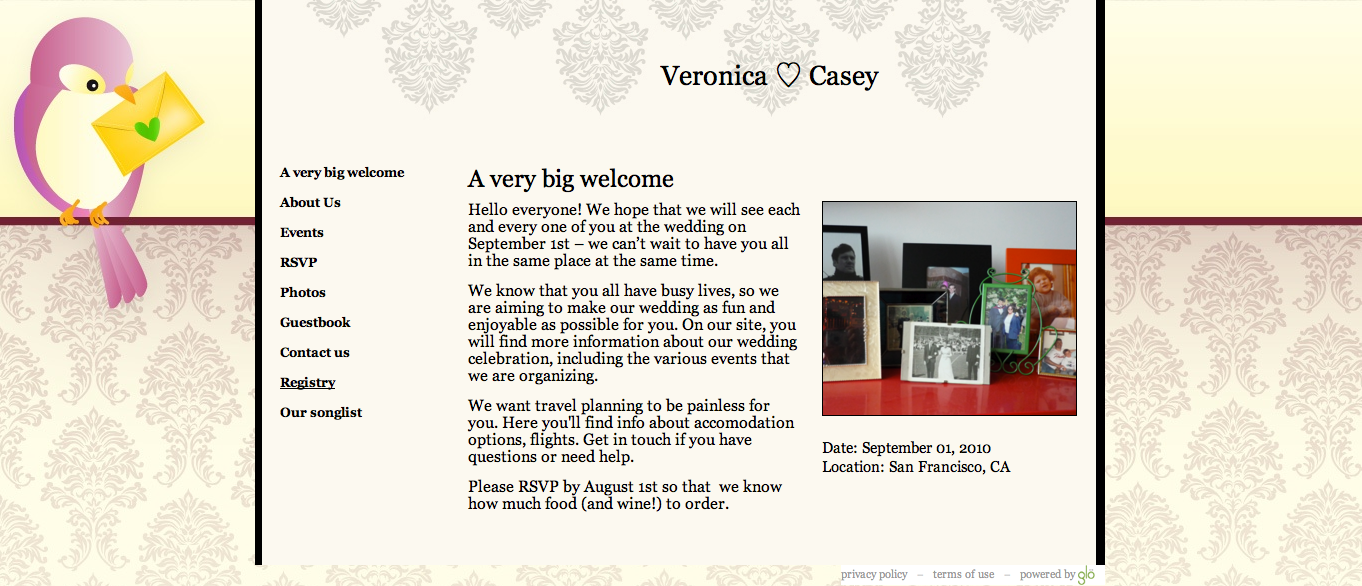
Here’s an adorable example I found on Free Twitter Skins – this one is called Winged Messenger. I uploaded the twitter design as the Glösite “background image” – anchored left. And then chose an existing Glö design for the “page design.” I think it’s a perfect match! Are ya diggin’ it?
We recently asked several Glöbies to fill out a survey to help us understand what you think about Glö and how we can improve. One comment I saw was a request for custom HTML on Glösite pages. The person didn’t leave their name, so I thought I’d just broadcast to everyone to let you know that this is possible! Using the HTML function, you can add photos, widgets, text, etc anywhere within the Glösite page. If the idea of HTML totally scares you, you can also continue to paste in widgets in the “widget box” – these will simply appear at the bottom of the page.
Let’s go through a quick step-by-step using a PacMan widget that I found on Widgetbox (My total go-to source for fun widgets!)
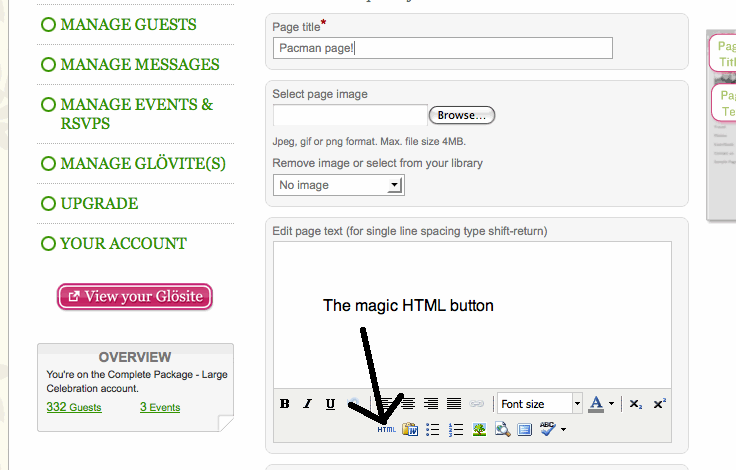
Go to ‘Manage Glövites’ > edit page and scroll down to the text box area. Here you’ll find a button labeled HTML.
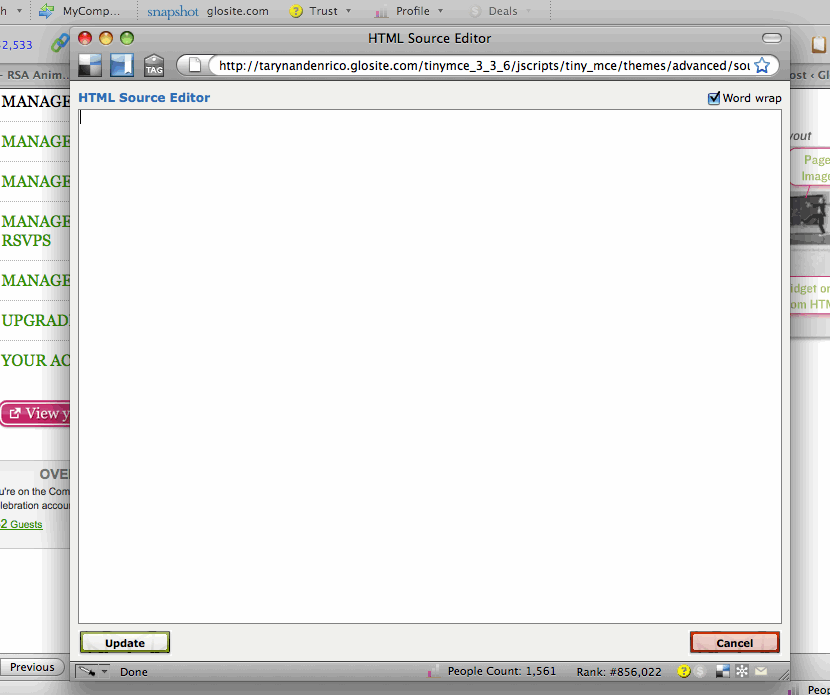
Click that bad-boy and another window will pop open.
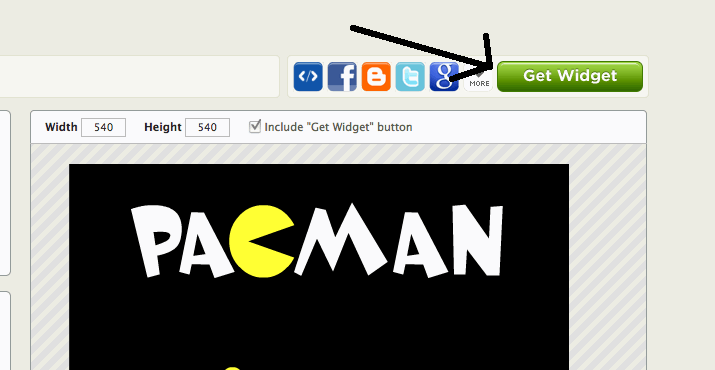
Now, flip over to the browser window with the widget you’re coveting and click ‘get widget’
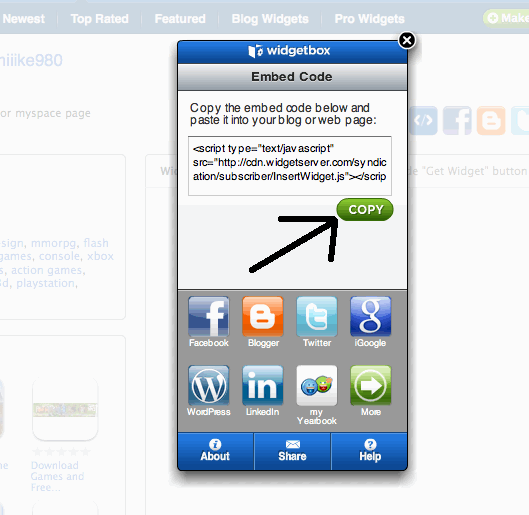
A box will pop up with the code you need to capture, so click ‘copy’
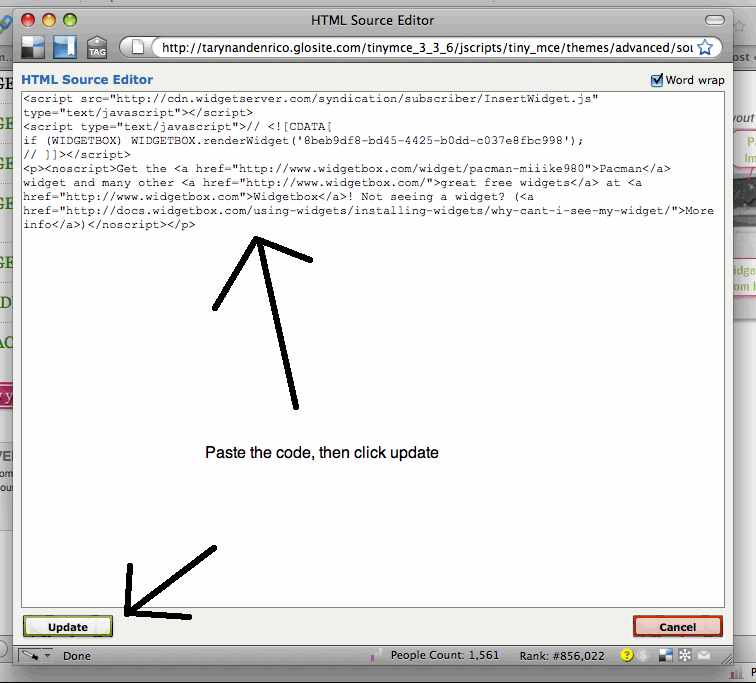
Now, flip back to the browser window with glosite.com open on it (if the HTML box has gone away, you might need to click the HTML button again.) Put your cursor inside the widget box and paste in the code you just copied, then click ‘update”
Scroll to the bottom of the Edit Glövite page and click ‘Save” – that’s it!! Now head on over to your Glösite to see the fabulousness you’ve just added! If you’ve followed these directions, you’ll now see this:
I, of course, spent an hour playing before I managed to publish this post!
Say that title three times fast! I’m always looking for helpful ways to organize information like the countless widgets that are out there for wedding websites. The handy-dandy list maker from Pick.In totally caught my eye. I’m going to test it out by using it to track interesting widgets that I discover online. If you have found fun widgets that you’d like to share, please feel free to contribute! I sorta like the way Pick.In easily allows you to give widgets the thumbs up or down and to contribute to a running list.
You guys know that I go all smiles when I witness your creativity first-hand. This is why I’m always pushing the development team to give you new ways to customize your sites and vites. Last week, we rolled out a new feature that lets you upload and/or customize the background designs and colors on your Glösites. I’ve seen several amazing creations so far – so I know you’re already all over it!
I started thinking…there must be a million and one sites that offer free background patterns. One search for “background pattern designs” totally confirmed my suspiscions. I found everything from libraries filled with thousands of designs to sites that actually let you build your own background. Here are a couple that I thought were worth sharing, but there are a slew more where this came from – so just get searching!
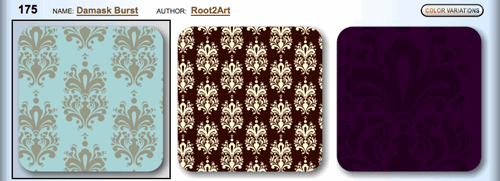
Pattern Cooler lets you choose from a huge number of seamless-pattern designs. These are designs that create a repetitive pattern when tiled. I love the variety they have. They even offer each pattern in multiple colors and variations like this Damask one below.
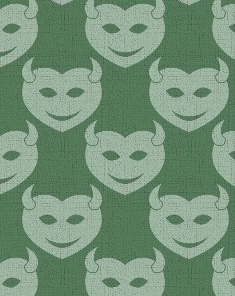
Another great site is BgPatterns. The best feature here is that you can choose an image to apply, change the image color and choose a background color to boot. How custom is that?!? I love this devil heart icon.
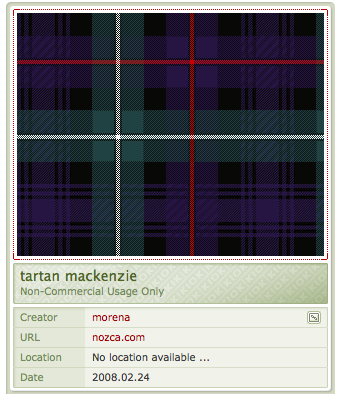
Another site my web-guru brother pointed out to me is Kaliber10000. I’m totally into this Tartan pattern – any Mackenzie’s in the house?
Have you found any other fab sites? If so, let everyone know with a comment below!
So Glöbies are incredibly resourceful. You guys find the absolute neatest zing and zang to add to your sites. A perfect example is the map that Kyle made with Google Maps for her site – it includes ALL the hotspots that her guests will need to know about (and get to) during her wedding celebration in Topsail Island. It even has nifty little icons to help guests differentiate a hotel from a restaurant.
Super cool, huh? I asked Kyle to write a ‘how to’ explanation so that others would be able to do the same. She’s such a good egg that soon after the below arrived in my inbox.
It’s super easy to do!
First thing you need is a Google account if you don’t have one already. Once you’re signed into your Google account, you go to http://maps.google.com/. On the lefthand side of the map, you’ll see two links: Get Directions and My Maps. Click on My Maps. If you’ve never made a Google Map before, a video will pop up that has a great tutorial on how to use the feature. From there you can either click on Learn More to get more details or just click on the Get Started button that’s below the video.
Once you click Get Started, you’ll have Title, Description, and Privacy Options. Give you map a title and description and then you can start dragging and dropping your icons all over the place! I find the easiest way to start is search in the map for the address that your map is going to be centralized around and then start dropping the icons for your points of interest.
Once, you’ve made your map, all you need to do is add it to your Glösite. In the top, right corner of your map, click on “link” – you can just grab the code under “Paste HTML to embed in website” or else you can choose to customize the map. Once you have the code – paste it into any of your Glösite pages by adding it in the widget box.
One of the neatest things about creating a Google Map is that you can share it with the world by making it “public.” Think of all the people in the world who you can help! Kyle told me:
I’ve already received emails from people who were going on vacation on Topsail and used my map during their holiday when they found it in a Google search so I’m glad it can help people beyond my circle.
In this day and age, it seems that almost every wedding has a multitude of out-of-town guests. It’s great, and makes us feel super-duper loved when folks travel from far and near to celebrate with us. However, some guests are more comfortable than others with booking travel arrangements. I am a travel fiend and am fairly obsessed with booking travel online (seriously, I think it’s a sickness.) Because of this, I sometimes (ok, often…) I forget that for friends and family members who don’t travel frequently, the simple act of finding flights can be daunting.
Since I know the Glö-bies out there love to make things as stress-free and easy going for your guests as possible, I did a bit of searching for some fun travel-related widgets that could help point your guests in the right direction. Helping your guests arrive at your celebration safe, sound, and with as little hassle as possible will ensure that they’re ready to pah-ty as soon as they arrive!
Flights, Cars and Hotels
Flight Status (ok, maybe this is more for YOU as you’re going nuts with excitement waiting for everyone to arrive!!)
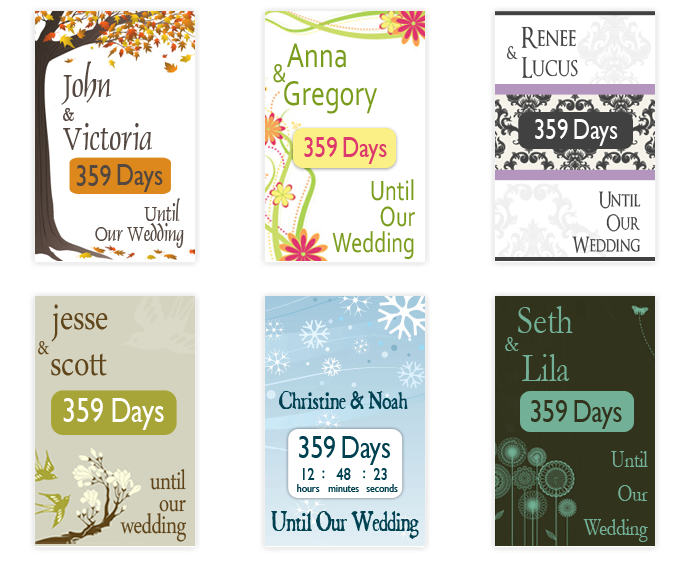
Ok, so I have to admit that I didn’t have a wedding date countdown on my own site – mostly because it reminded me of how much I had to get done in such little time. But if I’d found these rather adorable designs from Wedding Countdown Widgets in time…I probably would have reconsidered!
Want your guests to know how fun your wedding celebration will be without spelling it out for them? Then JibJab is your next destination. These are the guys behind the Elf Yourself application that we ROTFLing about each December. You can choose from a number of “starring you” videos (many of them free!) and easily insert the most amusing photos you can find as the heads of the characters.
Personalize funny videos and birthday eCards at JibJab!
Dress yourselves up as gymnasts, rhythmic dancers, even Romeo and Juliet (like, oh my god, totally modern-style.) Or treat your guests to a Chipendale’s performance staring your wedding party. No matter what – you and your guests will have tears rolling down their faces.
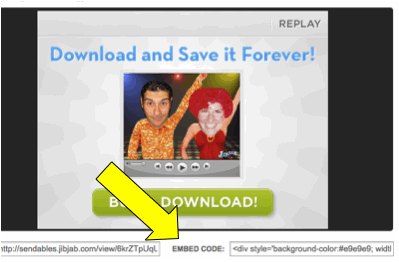
Adding a video to your website is easy. Simply go to JibJab – choose a video, upload your “heads” and click save. Copy and paste the ‘embed code’ into the widget box on any page of your Glösite (or another wedding website, if it accepts widgets or custom HTML.)
Simply cut and paste the embed code into the widget box on any of your Glösite pages
If it’s not quite serious enough for the overall tone of your day, you can always include the video on your website when you send out your announcements or save the dates and then remove before sending out your invitations. Or else it can make a great addition to your website after your event (you won’t believe the excellent photos you’ll have to work with after several hours of open bar…) No matter what – the addition of a JibJab video is guaranteed to set the tone for a party that your friends and family know they can look forward to.
UPDATE: Unfortunately, slide.com is no longer available for use. However Kizoa appears to be a good alternative.
Everyone loves photos. But if you’re going to add photos to you wedding website, why not have a bit of fun with it? If your wedding website allows you to add widgets or custom HTML it’s easy to embed fun and funky slideshows (like the one below) directly into your site.
To make your slideshow - Slide.com is a great place to start – it’s easy to use and it’s free! Using Slide – you can add photos and then customize the show’s style, skin, music, & effects to make it snazzy. Once you’re finished designing your show, click save and you’ll move on to the ‘Share slide show’ page. On the left side of the page, select Hi5 or Blogger to access the HTML code for your slide show. Copy the code, flip over to your wedding website editor, and paste the code into the widget or custom HTML box of the page where you want it to appear (on Glosite.com, you’ll find a widget box at the bottom of each “edit page.’) That’s it!
Have fun with your show — mix it up a bit (maybe think twice before adding 50 shots of you and the fiance looking perfectly perfect!) Remember, the more personal it is the more fun it will be for your friends and family to view.

 Now, flip back to the browser window with glosite.com open on it (if the HTML box has gone away, you might need to click the HTML button again.) Put your cursor inside the widget box and paste in the code you just copied, then click ‘update”